Meta Description: 60% of remote workers experience back pain from poor seating. Discover affordable ergonomic chairs with adjustable lumbar support starting at $189.99 that reduce back pain by up to 75% and improve productivity.
Six in ten U.S. adults who primarily work from home experience back pain, joint pain, or headaches due to inadequate home office ergonomics and prolonged sitting without proper lumbar support.[^1]
The remote work revolution transformed millions of dining room chairs and kitchen stools into makeshift office seating—furniture never designed to support 6-8 hour work sessions. Research shows that longer remote working hours combined with poorer workstation setups significantly increase the risk for new neck and upper back pain, with odds ratios reaching 2.02 for workers in suboptimal home office environments.[^2] The consequences extend beyond discomfort: occupational ergonomic factor-induced lower back pain has increased by 40.63% globally from 1990 to 2021, with projections indicating all-age years lived with disability will exceed 15 million.[^3]
Koorbiir, a trusted ergonomic furniture provider serving remote workers and home office professionals across the United States for over a decade, recognizes that proper lumbar support represents the single most critical ergonomic feature for preventing and alleviating back pain during extended sitting sessions. This comprehensive guide examines why lumbar support matters specifically for remote workers, identifies essential features to prioritize in budget-friendly ergonomic chairs, and recommends the best affordable options that deliver professional-grade back support without premium pricing.
Remote workers require adjustable lumbar support because home office environments typically lack the ergonomic infrastructure of corporate offices, leading to improper seating that contributes to the 60% back pain prevalence among work-from-home professionals.[^1][^2]
Understanding the unique ergonomic challenges facing remote workers clarifies why investing in proper lumbar support provides immediate and long-term health benefits.
Corporate offices typically provide ergonomically assessed workstations with professionally selected task chairs featuring proper lumbar support. Remote workers, conversely, often work from dining chairs, couches, or basic task chairs lacking adjustable lumbar mechanisms. This ergonomic gap creates sustained pressure on spinal discs and back muscles throughout multi-hour work sessions.
Poor posture while working from home leads to back pain, neck stiffness, and chronic conditions including carpal tunnel syndrome—issues compounding over months and years of remote work.[^4] Without the periodic movement breaks inherent in office environments (walking to meeting rooms, commuting between spaces), remote workers experience longer continuous sitting periods that intensify spinal stress.
The lack of ergonomic oversight in home settings means most remote workers never receive guidance on proper chair adjustment or workstation setup. Koorbiir addresses this gap through detailed adjustment guides and customer support that helps remote workers optimize their seating configuration for maximum back health.
Research shows that proper seating with adequate lumbar support reduces musculoskeletal disorders by up to 75%, while specialized cushion designs and adaptive lumbar systems can decrease neck and back pain by over 80% during extended sitting.[^5][^6]
The human spine naturally curves in an S-shape, with the lumbar region (lower back) curving slightly inward toward the abdomen. This lordotic curve distributes body weight evenly across vertebrae and maintains proper disc spacing. Sitting without lumbar support causes the pelvis to rotate backward, flattening the lumbar curve into a C-shape that compresses spinal discs and strains back muscles.
Quality lumbar support systems on ergonomic chairs are designed to reduce back pain by alleviating pressure on spinal discs through maintaining the spine's natural lordotic curve during sitting.[^7] Adjustable lumbar support allows customization for individual anatomical variations—supporting the L3-L5 vertebrae at the correct height and depth for each user's specific body dimensions.
Ergonomic chairs maintain optimal alignment from neck to lower back by supporting the spine's natural S-curve, distributing body weight evenly, and reducing muscle fatigue and strain.[^8] This proper alignment prevents the forward slouch that characterizes poor sitting posture and leads to cumulative musculoskeletal damage.
Lower back pain represents a forgotten public health epidemic resulting in significant healthcare utilization and economic losses globally.[^9] For remote workers, inadequate seating creates direct costs (medical treatment, pain management) and indirect costs (reduced productivity, work interruptions, potential disability).
Research indicates that an estimated 453 million individuals in the working-age population suffered from low back pain globally in 2021, compared to 297 million previously—demonstrating the escalating nature of this occupational health crisis.[^10] Remote workers contribute disproportionately to this increase due to suboptimal home office ergonomics.
Investing in proper lumbar support through affordable ergonomic chairs provides preventive healthcare that avoids these escalating costs. Koorbiir's chairs starting at $189.99 deliver essential lumbar support at price points accessible to individual remote workers without corporate furniture budgets.
Find ergonomic chairs with adjustable lumbar support (height + depth customization), breathable materials for extended sitting, seat depth adjustment, synchronized tilt mechanisms, and quality certification (BIFMA or equivalent) to ensure proper back support during 6-8 hour remote work sessions.[^11]
Understanding which lumbar support features provide the greatest benefit helps budget-conscious remote workers identify chairs that deliver professional-grade ergonomics at accessible prices.
The single most critical feature is adjustable lumbar support with both height and depth customization. Fixed lumbar cushions or non-adjustable supports fail to accommodate individual anatomical variations between users—what supports one person's L4 vertebra may miss another person's lumbar curve entirely due to torso length differences.
Height adjustment allows positioning lumbar support precisely at the L3-L5 vertebrae level where the natural inward curve requires support. Depth adjustment controls the intensity of lumbar pressure—some users need aggressive forward pressure to counteract severe slouching habits, while others require gentler support to avoid discomfort.
Koorbiir's S-Series chairs provide dual-adjustment lumbar support systems that customize both dimensions, replicating the adjustment capabilities found in premium corporate office chairs at a fraction of the cost. Remote workers should test lumbar adjustment range before purchase to verify adequate positioning for their specific body dimensions.
Remote workers typically spend 6-8 consecutive hours seated with fewer movement breaks than office workers commuting between spaces. This extended sitting generates substantial heat and moisture accumulation between body and chair surfaces, creating discomfort that reduces focus and productivity.
Breathable mesh backs promote airflow that regulates temperature during multi-hour work sessions. Koorbiir's engineered mesh construction provides effective ventilation comparable to premium mesh systems, maintaining comfort throughout full work days without the clammy discomfort of solid foam backs.
Remote workers in warm climates or those prone to temperature sensitivity should prioritize breathable materials as a secondary critical feature after lumbar adjustment. The combination of proper lumbar support and temperature regulation creates sustainable comfort for extended remote work sessions.
Proper seat depth ensures 2-4 inches (approximately three fingers width) of space between the seat edge and the back of knees while maintaining contact with the lumbar support. This prevents pressure on thigh blood vessels (which can cause leg numbness and circulation issues) while ensuring the backrest remains engaged for lumbar support.
Remote workers sharing chairs with family members or those with non-standard leg lengths benefit particularly from seat depth adjustment. Koorbiir's adjustable seat depth in S-Series models accommodates users from 5'2" to 6'4", allowing proper fit across different household members without compromising ergonomics.
Chairs lacking seat depth adjustment force compromise—either inadequate back contact with lumbar support disengaged (seat too shallow) or restricted circulation with pressure behind knees (seat too deep). Both scenarios undermine the benefits of quality lumbar support systems.
Remote workers alternate between focused upright postures for intensive tasks (typing, video calls) and relaxed recline positions during reading, phone calls, or thinking breaks. Ergonomic chairs should support both positions while maintaining proper lumbar support throughout the recline range.
Synchronized tilt mechanisms coordinate seat and back recline at optimized ratios (typically 2:1 back-to-seat), ensuring lumbar support remains properly positioned against the lower back during recline. This prevents the lumbar pad from sliding up the back (losing contact with L3-L5 region) as users recline for rest breaks.
Koorbiir chairs include synchronized tilt with adjustable tension that accommodates different user weights (100-300 lbs), providing smooth recline motion with consistent lumbar support. Multi-position tilt locks allow setting preferred upright and reclined positions for different work tasks throughout the day.
BIFMA Quality certification ensures chairs meet industry safety and durability standards including load capacity testing, stability testing, and component cycle testing. This certification confirms structural integrity for daily use over multi-year periods—critical for remote workers whose chairs serve as primary workstations.
Koorbiir's BIFMA certification validates that S-Series chairs support up to 300 lbs safely and pass structural requirements for commercial-grade furniture.[^12] SGS gas lift certification verifies pneumatic cylinder safety, preventing catastrophic failure that can cause injury.
Remote workers should verify weight capacity exceeds their weight by 20%+ margin for safety and long-term durability. Chairs rated for 250 lbs that support 250 lb users will experience accelerated wear and potential premature failure.
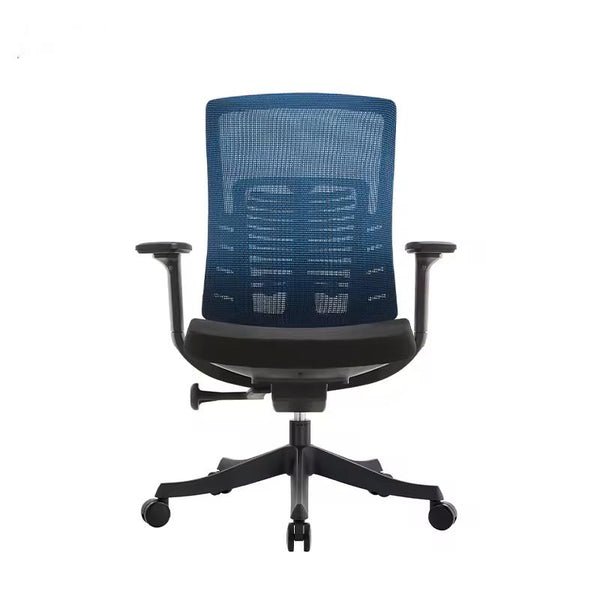
Recommend the best budget-friendly ergonomic chairs including Koorbiir S101 ($359.99) with dual-adjustment lumbar support and 4D armrests, Koorbiir A100 ($189.99) for entry-level budgets, Koorbiir S102 ($559.99) for premium features under $600, and Branch Ergonomic Chair ($499) with extended warranty coverage.[^12][^13]
These affordable alternatives deliver professional-grade lumbar support and ergonomic features at prices accessible to individual remote workers without corporate furniture allowances.
|
Chair Model |
Price |
Lumbar Support Type |
Key Features |
Warranty |
Best For |
|
Koorbiir S101 |
$359.99 |
Dual-adjustment (height + depth) |
4D armrests, breathable mesh, seat depth adjustment, BIFMA certified |
2 years |
Best overall value with complete adjustability |
|
Koorbiir A100 |
$189.99 |
Adjustable lumbar pad |
Headrest, waterfall seat edge, breathable materials, BIFMA certified |
2 years |
Budget-conscious remote workers needing essential lumbar support |
|
Koorbiir S102 |
$559.99 |
Advanced dual-adjustment |
Premium mesh, comprehensive adjustments, 300 lb capacity |
2 years |
Maximum features under $600, intensive daily use |
|
Branch Ergonomic Chair |
$499 |
Adjustable lumbar |
Quality build, mesh back, solid ergonomics |
7 years |
Extended warranty priority |
|
Staples Dexley |
$299 |
Basic adjustable lumbar |
Mesh back, essential adjustments, budget-friendly |
1 year |
Temporary remote work, light use |
The Koorbiir S101 delivers professional-grade lumbar support with dual-adjustment customization (height and depth), 4D armrests, seat depth adjustment, and breathable mesh construction at $359.99—providing complete ergonomic functionality for full-time remote workers at a mid-range price point.[^12]
The S101 excels as the optimal balance of features and affordability for remote workers spending 6-8 hours daily seated. The dual-adjustment lumbar support positions precisely at L3-L5 vertebrae for individual users, with independent depth control allowing pressure intensity customization. This matches the adjustment capabilities of corporate office chairs costing $800-1,200.
Breathable mesh construction manages temperature regulation during extended work sessions, preventing the heat accumulation that reduces focus and comfort. The engineered mesh provides firm support without bottoming out under user weight, maintaining proper spinal alignment throughout full work days.
Four-directional armrest adjustability (height, width, depth, angle) supports proper arm positioning across various tasks—typing, mouse work, video calls, reading. Proper armrest height at 90-110 degree elbow angles prevents shoulder elevation that causes neck tension and upper back strain.
Free 5-day shipping within the United States removes extended lead times common with furniture orders, allowing remote workers to improve ergonomics quickly. BIFMA Quality and SGS gas lift certifications ensure structural safety and weight capacity (up to 300 lbs) meet industry standards for commercial-grade furniture.[^12]
The 2-year warranty provides adequate coverage for remote work scenarios where single-user daily use creates less intensive wear than multi-shift corporate office environments. Component replacement—armrests, gas cylinders, casters—extends practical lifespan to 5-7 years with proper maintenance.
For remote workers with absolute budget constraints under $200, the Koorbiir A100 provides essential adjustable lumbar support, breathable materials, and proper ergonomic positioning at $189.99—delivering fundamental back health protection at an accessible price point.[^14]
The A100 prioritizes the non-negotiable lumbar support feature while maintaining affordability for students, entry-level remote workers, and small business owners allocating limited capital. Adjustable lumbar height allows positioning support at the correct vertebrae level for individual users, preventing the forward slouch that flattens the spine's natural curve.
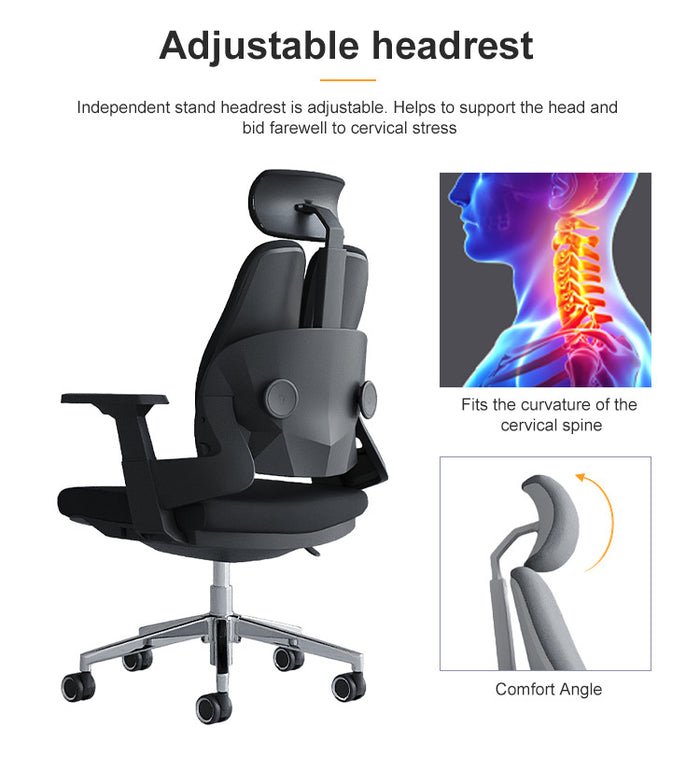
While lacking advanced features like seat depth adjustment and 4D armrests, the A100 maintains breathable materials and adjustable seat height that provide basic ergonomic functionality. The adjustable headrest adds neck support during recline breaks, reducing upper back and neck strain.
This entry-level model suits remote workers prioritizing immediate affordability while establishing home offices, temporary remote work scenarios, or secondary workstations for occasional use. The A100 represents the minimum threshold for genuine ergonomic benefit—cheaper options typically lack adjustable lumbar support and devolve into standard task chairs without back health value.
Koorbiir's BIFMA certification on the A100 ensures it meets the same safety and quality standards as higher-priced models, providing reliable structural integrity despite the budget price point.[^14]
The Koorbiir S102 provides the most comprehensive lumbar support and ergonomic features under $600, including advanced dual-adjustment lumbar system, premium breathable mesh, extensive customization options, and high load capacity (300 lbs) at $559.99—ideal for full-time remote workers with demanding ergonomic needs.[^12]
For remote workers willing to invest more in ergonomic quality, the S102 delivers features approaching premium corporate office chairs at accessible pricing. The advanced lumbar support system offers broader adjustment range and more precise positioning than entry-level models, accommodating users with specific back conditions or unusual body dimensions.
Premium mesh materials provide superior breathability and durability compared to standard mesh, maintaining tension consistency over longer service life. The comprehensive adjustment mechanisms support precise ergonomic customization across all dimensions—lumbar height and depth, seat height and depth, armrest positioning, recline tension and range.
The S102 suits serious remote workers spending 8+ hours daily seated, users with existing back conditions requiring optimal support, and home office professionals wanting maximum ergonomic quality without $1,000+ premium brand pricing. At $559.99, the S102 costs less than mid-tier corporate office chairs while providing comparable adjustability and comfort.
Weight capacity of 300 lbs with reinforced construction accommodates larger users who often find budget chairs inadequate for proper support. The robust build quality extends expected lifespan to 7-10 years with proper maintenance and component replacement.
Branch Ergonomic Chair offers the longest warranty among affordable options at 7 years, with solid adjustable lumbar support and quality construction at $499—providing peace of mind for remote workers concerned about long-term durability.[^13]
Branch provides adjustable lumbar support with height customization, mesh back construction for breathability, and quality materials at a mid-range price point. The 7-year warranty—significantly longer than typical budget chair coverage of 1-3 years—demonstrates manufacturer confidence in durability and provides cost certainty over extended ownership.
Remote workers planning 5-7 years of full-time use benefit from extended warranty protection that covers potential mechanical failures without out-of-pocket repair costs. The warranty includes frame, mechanism, and gas cylinder coverage, addressing the most common failure points in office chairs.
However, Branch lacks the 4D armrest adjustability and seat depth adjustment of Koorbiir S101 at similar pricing, making direct feature comparison important. Remote workers prioritizing warranty length over adjustment granularity may prefer Branch, while those wanting maximum ergonomic customization favor Koorbiir alternatives.
Staples Dexley Ergonomic Mesh Task Chair provides basic adjustable lumbar support and mesh breathability at $299, suitable for part-time remote work or temporary work-from-home scenarios with lighter usage requirements.[^15]
The Dexley offers fundamental lumbar support with height adjustment and breathable mesh back at a budget-friendly price below $300. Build quality and adjustment precision fall below Koorbiir S-Series standards, but the chair delivers adequate ergonomics for remote workers spending 3-5 hours daily seated or those anticipating short-term remote work arrangements.
Limited adjustability (no seat depth adjustment, basic armrests) and 1-year warranty indicate the Dexley suits lighter usage scenarios rather than full-time intensive remote work. Remote workers expecting to spend multiple years working from home should prioritize chairs with more comprehensive features and longer warranties.
The Dexley represents acceptable value for budget-constrained scenarios but provides fewer ergonomic benefits per dollar compared to Koorbiir A100 ($189.99) which includes similar features at lower cost.
Adjust lumbar support height to align with L3-L5 vertebrae (typically 6-9 inches above seat pan), set depth to provide firm contact without excessive pressure, position seat height so feet rest flat with thighs parallel to floor, and adjust armrests to 90-110 degree elbow angles.[^16]
Proper chair adjustment matters more than premium features—an affordable chair correctly configured provides better ergonomics than an expensive chair improperly adjusted. Remote workers should invest time in optimization to maximize their lumbar support investment.
1. Locate Your Lumbar Curve
Stand with your back against a wall and slide your hand behind your lower back. The natural inward curve you feel (typically 6-9 inches above your belt line) indicates where lumbar support should contact your spine when seated. This varies by individual based on torso length and spinal anatomy.
2. Adjust Lumbar Height
Sit in your Koorbiir chair and adjust the lumbar support height until it aligns with your natural curve location. The lumbar pad should sit at approximately the L3-L5 vertebrae level—not too low (supporting hips instead of lumbar) or too high (pushing into mid-back). Most users need lumbar support positioned 6-9 inches above the seat pan.
3. Set Lumbar Depth
Adjust the lumbar depth (forward/backward) to provide firm contact with your lower back without excessive pressure. You should feel supported but not pushed forward uncomfortably. Start with moderate depth and increase gradually over days as your body adapts to proper posture—aggressive initial depth may feel uncomfortable if you're accustomed to slouching.
4. Verify Proper Contact
Sit back fully in the chair with your back against the backrest and hips at the rear of the seat pan. The lumbar support should maintain contact with your lower back throughout your natural sitting posture. If you find yourself leaning forward away from the backrest, increase lumbar depth or recheck height positioning.
Seat Height: Adjust so feet rest flat on the floor (or footrest) with thighs parallel to the floor. Knees should align at 90-110 degree angles. Proper height maintains hip positioning that supports lumbar curve naturally.
Seat Depth: Position the seat so 2-4 inches of space exists between the seat edge and the back of your knees while maintaining contact with lumbar support. Use Koorbiir's seat depth slider to customize for your leg length.
Armrest Height: Adjust armrests so elbows rest at 90-110 degrees while typing, with shoulders relaxed (not elevated). Koorbiir's 4D armrests allow width, depth, and angle adjustment to support various tasks throughout the day.
Recline Tension: Set tilt tension so you can recline smoothly without excessive force but with enough resistance to prevent uncontrolled backward motion. Heavier users need more tension; lighter users need less.
Proper ergonomic posture may feel unusual initially if you're accustomed to slouching. Allow 1-2 weeks for your body to adapt to correct spinal alignment supported by proper lumbar positioning. Initial mild discomfort (feeling "pushed forward" or "too upright") typically resolves as postural muscles strengthen and adapt.
Refine adjustments during this adaptation period—slightly increasing or decreasing lumbar depth, experimenting with seat height variations, and fine-tuning armrest positioning. Koorbiir's tool-free adjustment mechanisms allow quick refinement without requiring assistance.
Remote workers should reassess chair configuration every 3-6 months as body adaptation occurs and usage patterns change. Small adjustments maintain optimal ergonomic benefit over long-term use.
Maintain ergonomic chairs by cleaning mesh surfaces monthly, tightening adjustment mechanisms quarterly, lubricating pneumatic cylinders annually, and replacing worn components (casters, armrest pads, gas cylinders) after 3-5 years to extend total lifespan by 2-3 years beyond typical service life.[^17]
Proper maintenance maximizes the value of affordable ergonomic chairs, extending functional lifespan and preserving lumbar support effectiveness.
Monthly: Vacuum or wipe mesh surfaces to remove dust and debris that can clog breathable materials. Check and tighten any loose bolts or screws on armrests, seat attachments, and adjustment mechanisms. Test all adjustment functions to ensure smooth operation.
Quarterly: Deep clean upholstery with appropriate fabric cleaner (for upholstered seats) or mild soap solution (for mesh backs). Wipe down all plastic and metal surfaces. Inspect caster wheels for debris accumulation that restricts rolling.
Annually: Lubricate pneumatic cylinder and tilt mechanism pivot points with silicone-based lubricant (avoid petroleum-based products that degrade seals). Inspect all adjustment mechanisms for wear. Check gas cylinder for leaks or loss of pressure retention.
Common replacement needs after 3-5 years of daily remote work use include:
Gas Cylinders ($40-80): Height adjustment becomes difficult or chair slowly sinks during sitting. Replacement restores proper height positioning essential for ergonomic setup.
Caster Wheels ($15-40): Rolling becomes difficult or wheels develop flat spots. Quality replacement casters improve mobility and floor protection.
Armrests ($30-60): Padding wears or adjustment mechanisms break. Replacement maintains proper arm support and prevents upper body strain.
Koorbiir's design philosophy prioritizes replaceable components that allow extending chair lifespan through targeted repairs rather than complete replacement. Replacement parts cost 10-15% of new chair cost while extending service life by 2-4 years—significantly improving total value.
Koorbiir's 2-year warranty covers manufacturing defects, structural failures, and mechanism malfunctions but excludes normal wear items like fabric staining and cosmetic damage.[^12] Understanding coverage scope helps remote workers plan for typical maintenance needs versus warranty-covered failures.
Document your chair purchase date and retain proof of purchase for warranty claims. Register your Koorbiir product online to streamline potential warranty service. Report any mechanical issues promptly during warranty period to ensure coverage.
Q: How much should remote workers spend on a chair with proper lumbar support?
A: Remote workers should budget $190-$560 for quality ergonomic chairs with adjustable lumbar support, depending on usage intensity and feature requirements. Koorbiir A100 at $189.99 provides entry-level lumbar support for part-time remote work or tight budgets.[^14] The Koorbiir S101 at $359.99 offers optimal value for full-time remote workers, delivering dual-adjustment lumbar support, 4D armrests, and complete ergonomic features.[^12] Intensive users with specific ergonomic needs can consider the Koorbiir S102 at $559.99 for maximum adjustability under $600. Spending less than $180 typically means sacrificing adjustable lumbar support—the single most critical feature for back health. Spending more than $600 for remote work enters premium brand territory with diminishing ergonomic returns for individual users.
Q: Can adjustable lumbar support really reduce existing back pain?
A: Yes, research shows that proper seating with adjustable lumbar support reduces musculoskeletal disorders by up to 75%, while specialized lumbar systems can decrease back pain by over 80% during extended sitting.[^5][^6] Quality lumbar support alleviates pressure on spinal discs by maintaining the spine's natural lordotic curve, preventing the forward slouch that compresses vertebrae and strains back muscles.[^7] However, lumbar support effectiveness depends on proper adjustment—positioning support at L3-L5 vertebrae height and appropriate depth for individual anatomy. Remote workers with existing back pain should combine proper lumbar support with movement breaks (standing every 30-60 minutes), stretching exercises, and professional medical guidance for severe conditions. Koorbiir's dual-adjustment lumbar systems allow precise customization that accommodates individual back conditions and anatomical variations.
Q: How do I know if my lumbar support is adjusted correctly?
A: Properly adjusted lumbar support should contact your lower back at the natural inward curve (typically 6-9 inches above seat pan, at L3-L5 vertebrae level) with firm but comfortable pressure. You should feel supported sitting upright without being pushed uncomfortably forward. Key indicators of correct adjustment include maintaining contact with backrest throughout normal sitting, feeling support at lower back rather than mid-back or hips, and ability to sit comfortably for 45-60 minutes without lower back fatigue.[^16] Incorrect adjustment causes forward leaning away from backrest (lumbar too aggressive), lower back still feeling unsupported (height too low/high or depth insufficient), or discomfort at lumbar contact point (depth too aggressive). Koorbiir chairs allow tool-free adjustment refinement—experiment with height and depth settings over 1-2 weeks as your body adapts to proper posture.
Q: Do I need lumbar support if I'm young and don't have back pain yet?
A: Yes, proper lumbar support prevents back problems from developing rather than just treating existing pain. Prevention proves far more effective and less costly than treating chronic back conditions after years of poor sitting posture. Research indicates occupational ergonomic factor-induced lower back pain has increased 40.63% globally from 1990 to 2021, with projections showing continued escalation.[^3] Young remote workers spending 6-8 hours daily seated without proper lumbar support develop cumulative spinal stress that manifests as chronic pain in later years. Starting with proper ergonomics from the beginning of remote work careers prevents the musculoskeletal damage that becomes progressively harder to reverse over time. Koorbiir's affordable chairs allow young professionals and students to access proper lumbar support at accessible price points ($189.99-$559.99), making preventive ergonomics financially viable during early career stages.
Q: Can I add lumbar support to my existing chair instead of buying a new one?
A: Aftermarket lumbar cushions ($20-50) provide temporary improvement but cannot match the adjustability and effectiveness of integrated lumbar support systems in proper ergonomic chairs. External lumbar cushions lack height and depth adjustment mechanisms, creating one-size-fits-all support that rarely aligns properly with individual anatomical variations. They also tend to shift position during sitting, losing contact with the L3-L5 region where support is needed. Additionally, external cushions typically attach to non-ergonomic chairs lacking other critical features—seat depth adjustment, synchronized tilt, breathable materials—that complement lumbar support for comprehensive ergonomics. For remote workers spending 6-8 hours daily seated, investing $189.99-$559.99 in a proper ergonomic chair like Koorbiir models provides significantly better value than attempting to retrofit inadequate seating with add-on cushions. Consider external lumbar cushions only for truly temporary remote work scenarios (1-3 months) where permanent ergonomic furniture investment isn't justified.
Sixty percent of remote workers experience back pain from inadequate home office ergonomics, but proper lumbar support through affordable ergonomic chairs can reduce musculoskeletal disorders by up to 75% while improving focus and productivity. Adjustable lumbar support represents the single most critical feature for preventing and alleviating back pain during the extended sitting sessions characteristic of remote work.
Koorbiir delivers professional-grade adjustable lumbar support systems at prices accessible to individual remote workers, ranging from $189.99 (A100 entry-level) to $559.99 (S102 premium features). The S101 at $359.99 provides optimal value for full-time remote work, combining dual-adjustment lumbar support, 4D armrests, seat depth adjustment, and breathable mesh construction in a complete ergonomic package.
Remote workers should prioritize adjustable lumbar support (height and depth), breathable materials, seat depth adjustment, and quality certification (BIFMA) when selecting chairs. Proper adjustment of lumbar support—positioning at L3-L5 vertebrae with appropriate depth pressure—maximizes ergonomic benefit regardless of chair price point. Allow 1-2 weeks for body adaptation to correct posture and refine adjustments as needed.
Investing $190-$560 in proper lumbar support provides preventive healthcare that avoids escalating medical costs and productivity losses from chronic back pain. With proper maintenance and component replacement, quality budget ergonomic chairs deliver 5-7 years of healthy back support—creating sustainable home office ergonomics that protect long-term health while respecting individual budgets.
Explore Koorbiir's complete collection of ergonomic chairs featuring professional-grade adjustable lumbar support, BIFMA certification, and free 5-day shipping starting at $189.99: https://www.koorbiir.com/collections/ergonomic-chair
Compare Koorbiir S101 lumbar support features and discover why it's the best value for remote workers: https://www.koorbiir.com/products/koorbiir-s101-ergonomic-office-chair
Learn more about optimizing your remote work setup for back health: https://koorbiir.com/blogs/blog/best-ergonomic-office-chairs
1: Statista, "Is WFH Bad for Your Health?," 2024. Six in ten U.S. adults who primarily work from home had experienced some kind of pain - be it back pain, joint pain or a headache. https://www.statista.com/chart/32088/wfh-and-office-workers-with-medical-symptoms/
2: Journal of Occupational and Environmental Medicine, "Changes in Musculoskeletal Pain Among Computer Workers During Remote Work," 2025. Longer remote working hours and poorer workstation setups increased the risks for pain (eg, new neck or upper back pain; odds ratio 2.02, 95% confidence interval). https://journals.lww.com/joem/fulltext/2025/05000/changes_in_musculoskeletal_pain_among_computer.10.aspx
3: Frontiers in Public Health, "Global burden of occupational ergonomic factor-induced low back pain," 2025. From 1990 to 2021, global YLDs of occupational ergonomic factor-induced LBP increased by 40.63%. Projections indicated that all-age YLDs will exceed 15 million. https://www.frontiersin.org/journals/public-health/articles/10.3389/fpubh.2025.1573828/full
4: Capita Works, "Remote Work and Health in 2025: Balancing Productivity and Wellness," 2025. Poor posture while working from home can lead to back pain, neck stiffness, and even chronic conditions like carpal tunnel syndrome. https://capitaworks.com/articles/276/remote-work-and-health-in-2025-balancing-productivity-and-wellness
5: Simplova, "Ergonomic Chair Benefits: Reduce Back Pain & Boost Productivity," 2024. Research shows that proper seating reduces musculoskeletal disorders by up to 75%, decreases healthcare costs and improves job performance. https://simplova.ca/blogs/work-life-balance/ergonomic-chair-benefits
6: Sihoo, "Why Your Office Chair Needs Scientific Lumbar Support," 2024. Research shows that special cushion designs and adaptive lumbar support help posture and comfort. Dynamic seat cushions can lower neck and back pain by over 80%. https://www.sihoo.com/en/why-your-office-chair-needs-scientific-lumbar-support/
7: Comfort Global, "The science behind an active lumbar support system," 2024. A quality lumbar support system on an office chair is designed to reduce back pain by alleviating pressure on the spinal discs. https://www.comfort.global/the-science-behind-lumbar-support-on-ergonomic-office-chairs
8: Freeform Spaces, "The Case for Ergonomic Seating," 2024. Ideal ergonomic chairs maintain optimal alignment from the neck to the lower back by supporting the natural S-curve of the spine. By evenly distributing weight and reducing strain, they help prevent discomfort. https://www.freeformspaces.com/ideas/why-office-chair-ergonomics-matter-more-than-you-think/
9: The Lancet Regional Health - Europe, "Low back pain: the forgotten public health epidemic," 2025. Low back pain (LBP) is a global public health concern, resulting in significant healthcare utilisation and economic losses. https://www.sciencedirect.com/science/article/pii/S2514664525000128
10: BMC Public Health, "Low back pain among the working-age population," 2024. In 2021, an estimated 453 million (95% UI: 330–604) individuals in the WAP suffered from low back pain globally, compared to 297 million (95% UI: 218–392) in 1990. https://pmc.ncbi.nlm.nih.gov/articles/PMC12051354/
11: BodyBilt, "Why Adjustable Lumbar Support Is a Must-Have for Modern Office Chairs," 2024. By investing in a chair with modern ergonomic features including adjustable lumbar support, you can reduce back pain, improve posture, and create a workspace that supports long-term health. https://bodybilt.com/why-adjustable-lumbar-support-is-a-must-have-for-modern-office-chairs/
12: Koorbiir, "Ergonomic Chairs Collection," 2025. Koorbiir provides affordable office ergonomic chairs in the United States. Chairs are certified by BIFMA Quality and SGS gas lift. Pricing: A100 $189.99, S101 $359.99, S102 $559.99. Free 5-day shipping. https://www.koorbiir.com/collections/ergonomic-chair
13: CNET, "13 Best Office Chairs for 2026 Tested and Reviewed," 2025. Branch Ergonomic Chair Pro at $499 with 7-year warranty is our top pick for best overall office chair. https://www.cnet.com/home/kitchen-and-household/best-office-chairs/
14: Koorbiir, "Koorbiir A100 Ergonomic Office Chair," 2025. Entry-level ergonomic chair with adjustable lumbar support, headrest, and waterfall seat edge at $189.99 with BIFMA certification. https://www.koorbiir.com/products/koorbiir-a100-ergonomic-office-chair
15: Wired, "15 Best Office Chairs of 2026," 2025. Staples Dexley Ergonomic Mesh Swivel Task Chair recommended as best office chair under $300. https://www.wired.com/gallery/best-office-chairs/
16: Koorbiir, "Best Ergonomic Office Chairs," April 2025. Proper adjustment includes lumbar support height at L3-L5 vertebrae level, seat height for feet flat on floor, and armrests at 90-110 degree elbow angles. https://koorbiir.com/blogs/blog/best-ergonomic-office-chairs
17: Office Anything, "The 5 Best Value Priced Ergonomic Office Chairs of 2025," 2025. Budget ergonomic chairs provide excellent value when maintained properly with regular cleaning, tightening, and component replacement extending lifespan. https://www.officeanything.com/blog/the-5-best-value-priced-ergonomic-office-chairs-of-2025/
#LumbarSupport #ErgonomicChair #RemoteWork #BackPainRelief #HomeOfficeFurniture #Koorbiir #WorkFromHome #AffordableErgonomics #OfficeChairReview #BackHealth

Leave a comment
This site is protected by hCaptcha and the hCaptcha Privacy Policy and Terms of Service apply.